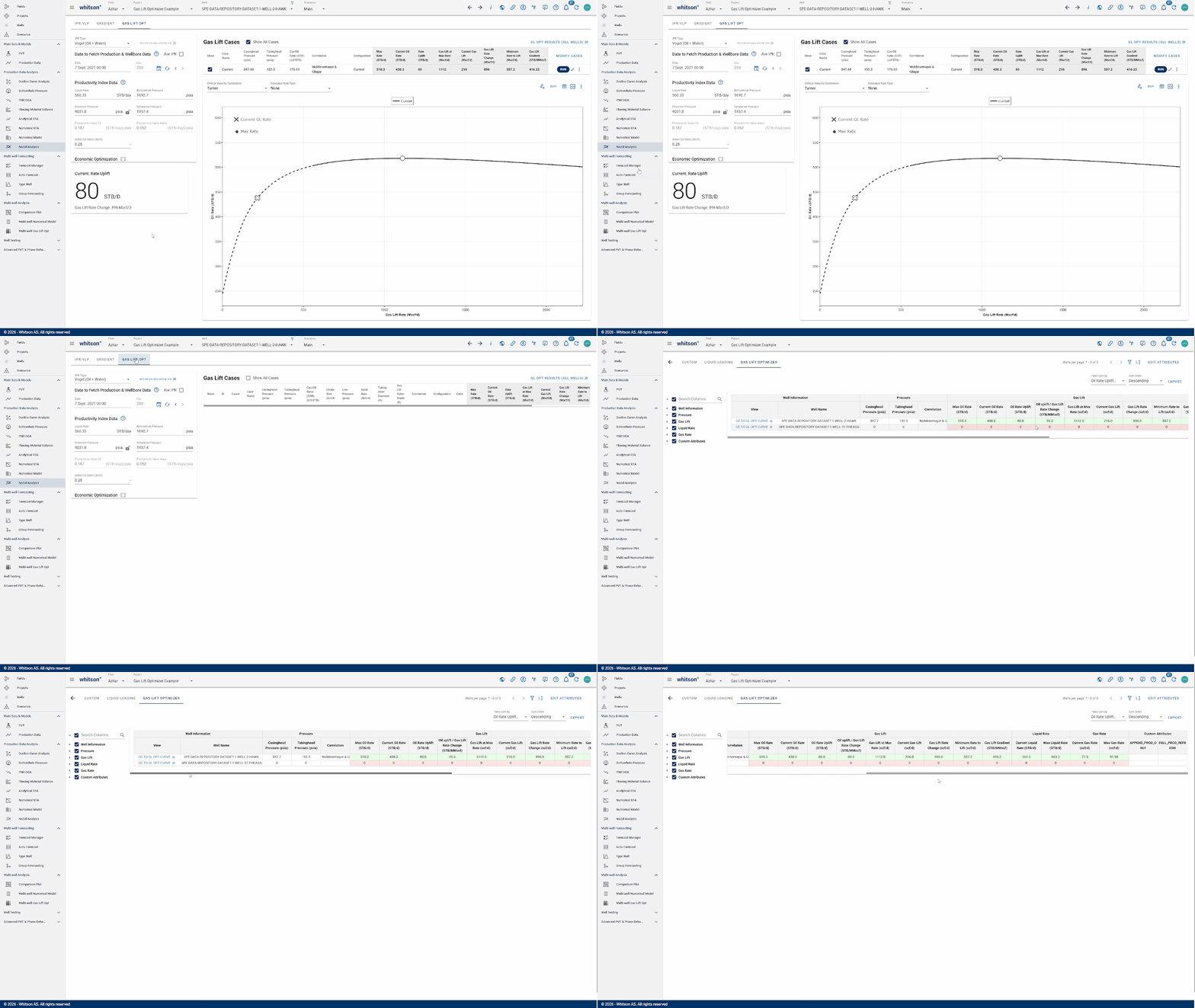
Gas Lift Optimizer
Gas Lift Optimizer is one of the modules within Nodal Analysis. A detailed explanation can be found here.
Before running this module or retrieving the analysis results, several prerequisites and required inputs must be prepared.
Before running the analysis, make sure the following inputs are available:
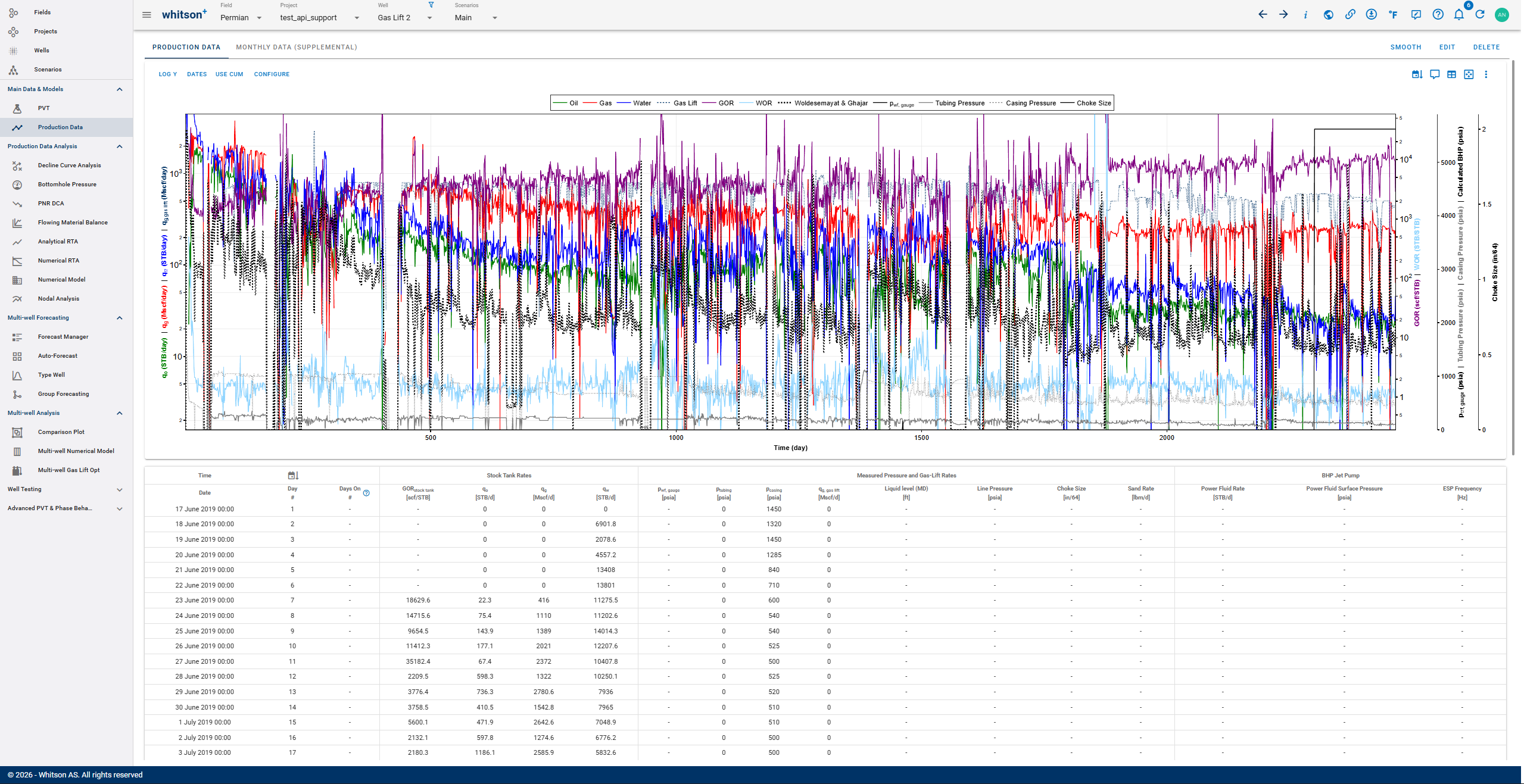
1. Production Data
Production data can be uploaded through the front end or via an endpoint, as shown in the example here
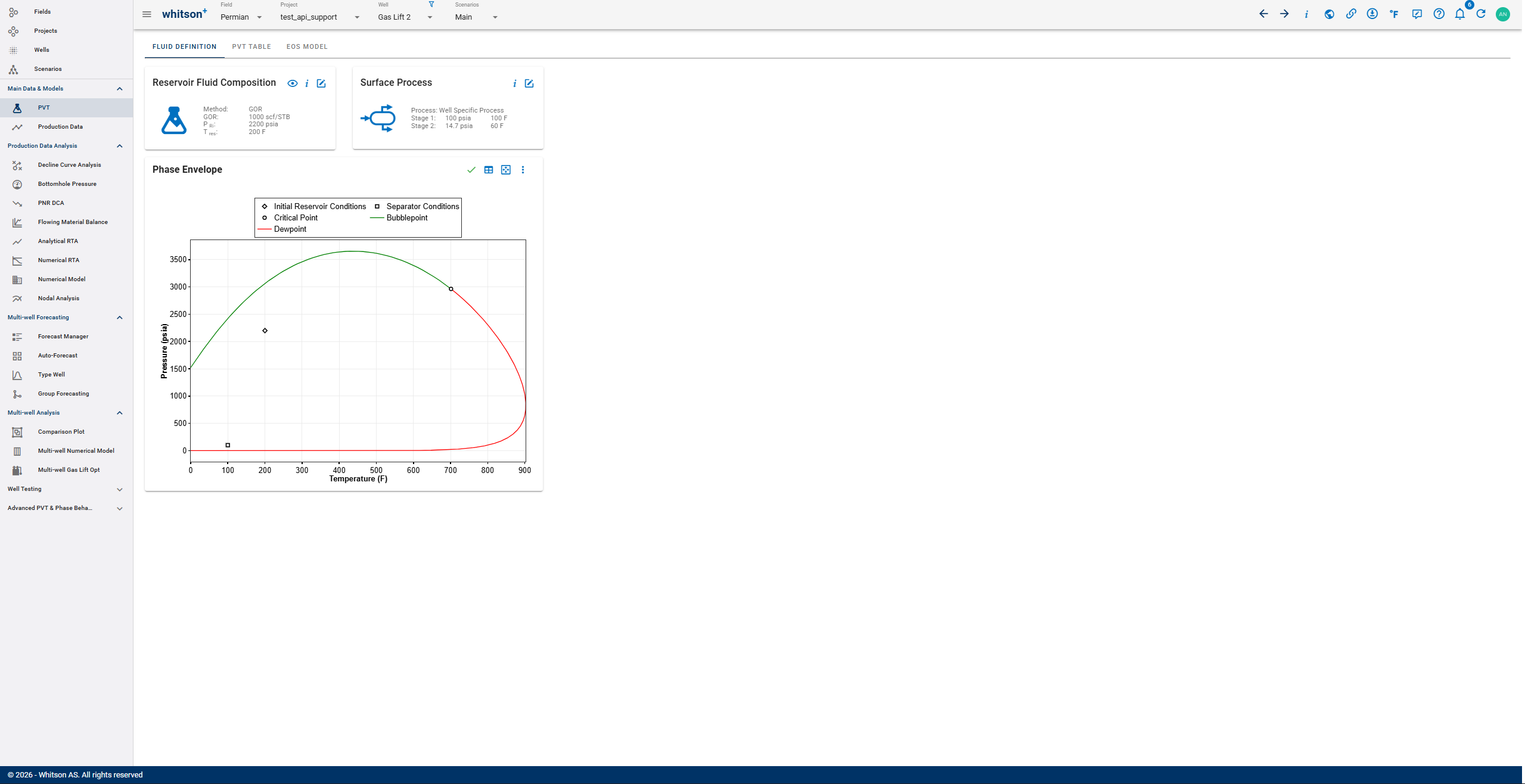
2. PVT Data
Helper Function
You can also obtain the whitson_connect.py, the key list template, and the environment setup tutorial here
Pre-Run Conditions
Check these conditions before running Gas Lift Optimizer:
When using the external API, it is recommended to include a time interval between each run. An example flow is shown below:
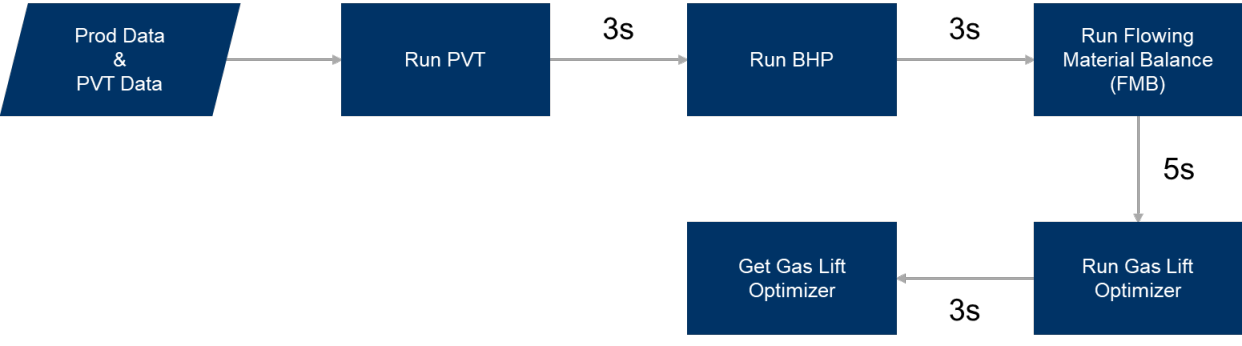
The endpoint queues a command to execute a run for a single well. Execution time may vary depending on the number of wells. Therefore, the process is not instantaneous.
For best practice when implementing automation, it is recommended to use a scheduler and separate the runs as follows:
-
Run PVT and BHP in the same script (Script_1.py)
Example schedule: 02:00 a.m.
a. Run PVT if there are changes in settings such as GOR, composition, or when a new well is added.
b. Run BHP according to the production data upload frequency in the system, or based on the required update frequency for the Gas Lift Optimizer results.
-
Run FMB in a separate script (Script_2.py)
Example schedule: 04:00 a.m.
-
Run GasLiftOpt in a separate script (Script_3.py)
Example schedule: 06:00 a.m.
-
Get the GasLiftOpt Result in (Script_4.py)
Example schedule: 07:00 a.m.
The schedule above is only an example and can be adjusted based on operational requirements.
Step-by-Step Run
Step 1: Run PVT
It only needs to be run once, unless there are changes in inputs such as GOR or composition.
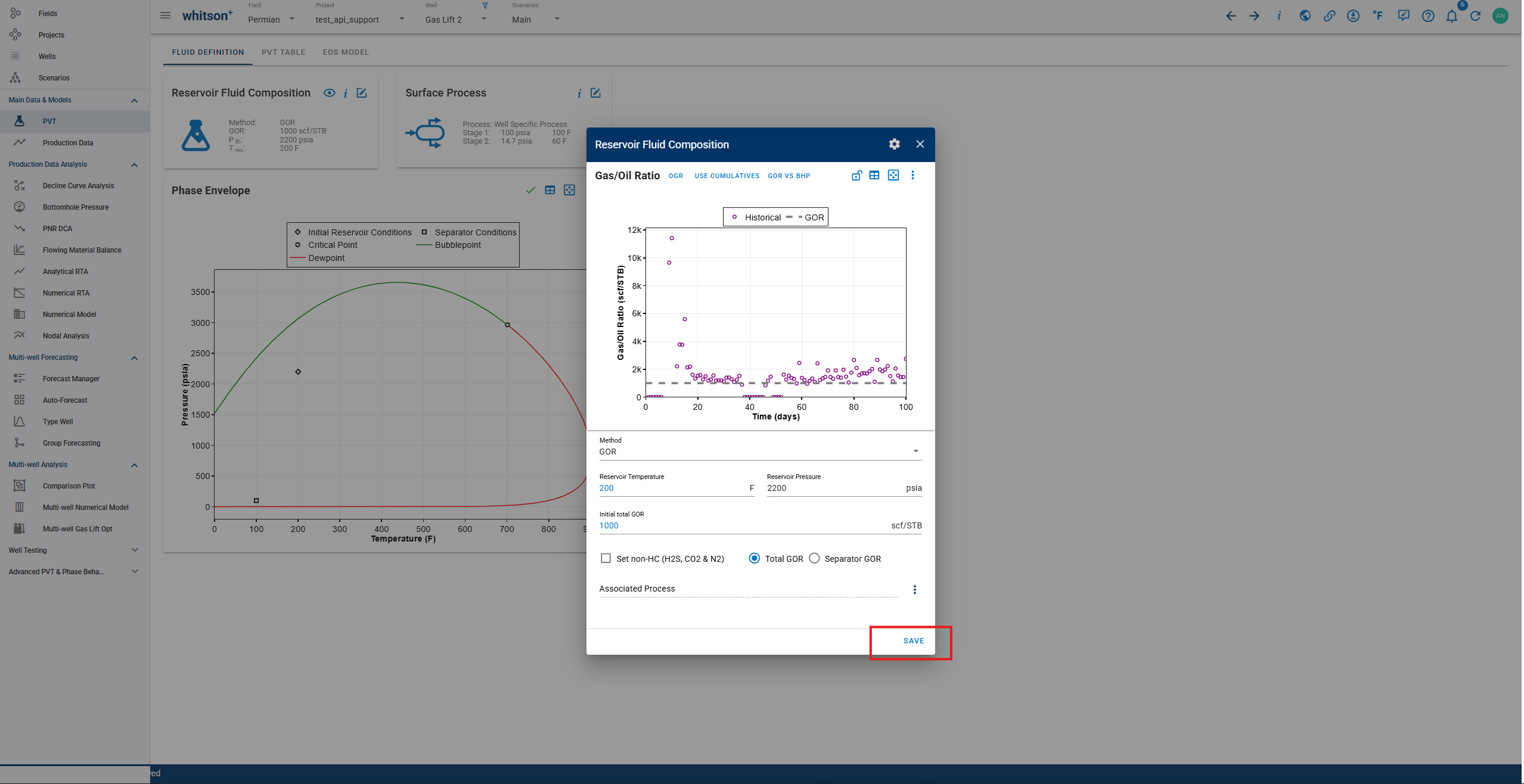
Or Using External API (available in Swagger):

 1
 2
 3
 4
 5
 6
 7
 8
 9
10
11
12
13 | def run_pvt_calc_bulk(whitson_connection, project_id: int):
response = requests.get(
f"http://{whitson_connection.client_name}.whitson.com/api-external/v1/wells/run_pvt_calc",
headers={
"content-type": "application/json",
"Authorization": f"Bearer {whitson_connection.access_token}",
},
params={“project_id”: project_id},
)
if response.status_code != 202:
print(f"Something went wrong with running pvt for scenario {scenario_id}")
print(f"{response.text}")
|
Example:
 1
 2
 3
 4
 5
 6
 7
 8
 9
10
11
12
13
14
15
16 | import whitson_connect # If the function inside whitson_connection
CLIENT = <INSERT CLIENT NAME>
CLIENT_ID = <INSERT CLIENT ID>
CLIENT_SECRET = <INSERT CLIENT SECRET>
whitson_connection = whitson_connect.WhitsonConnection(
CLIENT, CLIENT_ID, CLIENT_SECRET
)
whitson_connection.access_token = whitson_connection.get_access_token_smart()
project_id = 1
whitson_connection.run_pvt_calc_bulk(project_id) # If inside whitson_connection
whitson_connection.run_pvt_calc_bulk(whitson_connection, project_id)
|
Step 2: Run BHP
This process must be executed whenever new production data is available or when there are changes to the wellbore configuration.
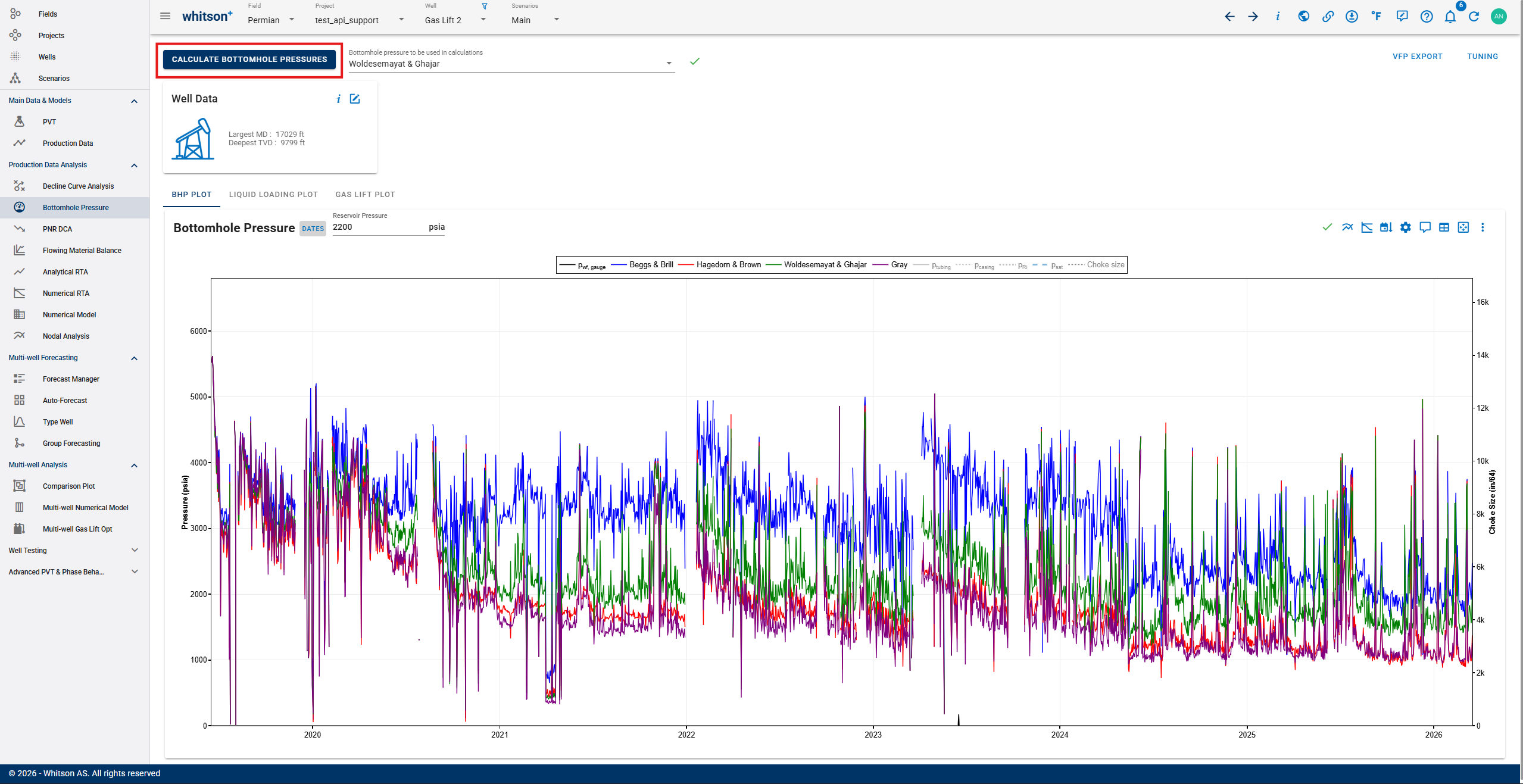
Or Using External API (available in Swagger):

 1
 2
 3
 4
 5
 6
 7
 8
 9
10
11
12
13
14
15
16
17
18
19
20
21 | def run_bhp_calc_bulk(
whitson_connection, project_id: int
) -> requests.Response:
"""
Run bhp calculation on the well specified by the provided well_id.
"""
base_url = f"http://{whitson_connection.client_name}.whitson.com/api-external/v1/wells/run_bhp_calculation"
response = requests.get(
base_url,
headers={
"content-type": "application/json",
"Authorization": f"Bearer {whitson_connection.access_token}",
},
params={“project_id”:project_id}
)
if response.status_code == 202:
print(f"successfully ran bhp calc on Well: {well_id}")
else:
print(response.text)
|
Example:
 1
 2
 3
 4
 5
 6
 7
 8
 9
10
11
12
13
14
15
16 | import whitson_connect # If the function inside whitson_connection
CLIENT = <INSERT CLIENT NAME>
CLIENT_ID = <INSERT CLIENT ID>
CLIENT_SECRET = <INSERT CLIENT SECRET>
whitson_connection = whitson_connect.WhitsonConnection(
CLIENT, CLIENT_ID, CLIENT_SECRET
)
whitson_connection.access_token = whitson_connection.get_access_token_smart()
project_id = 1
whitson_connection.run_bhp_calc_bulk(project_id) #If inside whitson_connection
whitson_connection.run_bhp_calc_bulk(whitson_connection, project_id)
|
Step 3: Run Flowing Material Balance
This step assumes that the Flowing Material Balance (FMB) analysis has already been completed beforehand. The purpose of this run is not to reanalyze the model, but to update the average reservoir pressure using the latest available production data.
To streamline the process, the bulk autofit feature available on the front end can be used to ensure that the FMB parameters remain properly calibrated before running this step.
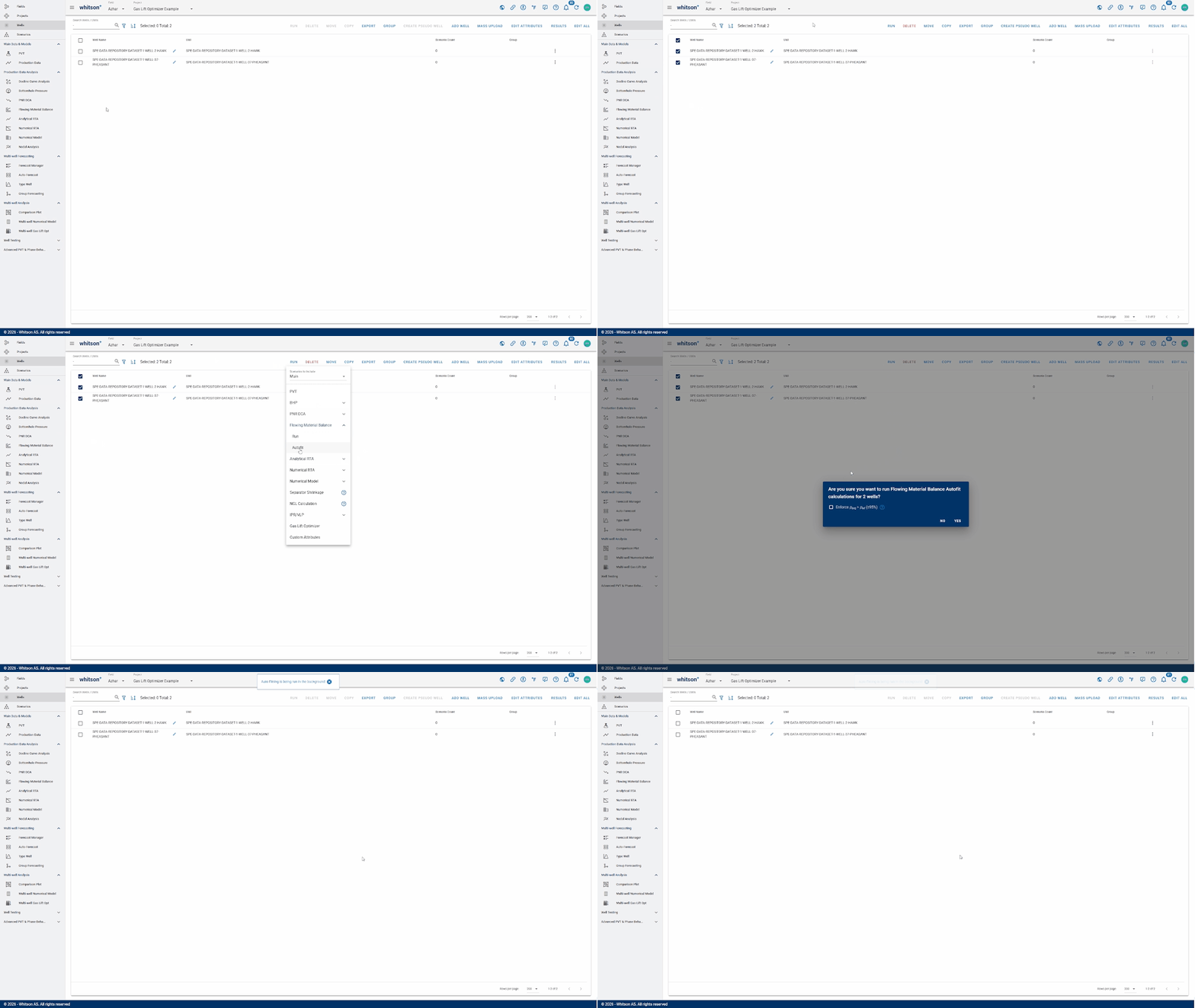
The output from this process is a key input for subsequent calculations, particularly in defining the well’s Productivity Index (PI). As a result, the accuracy of this step has a direct impact on the reliability of the Gas Lift Optimization.
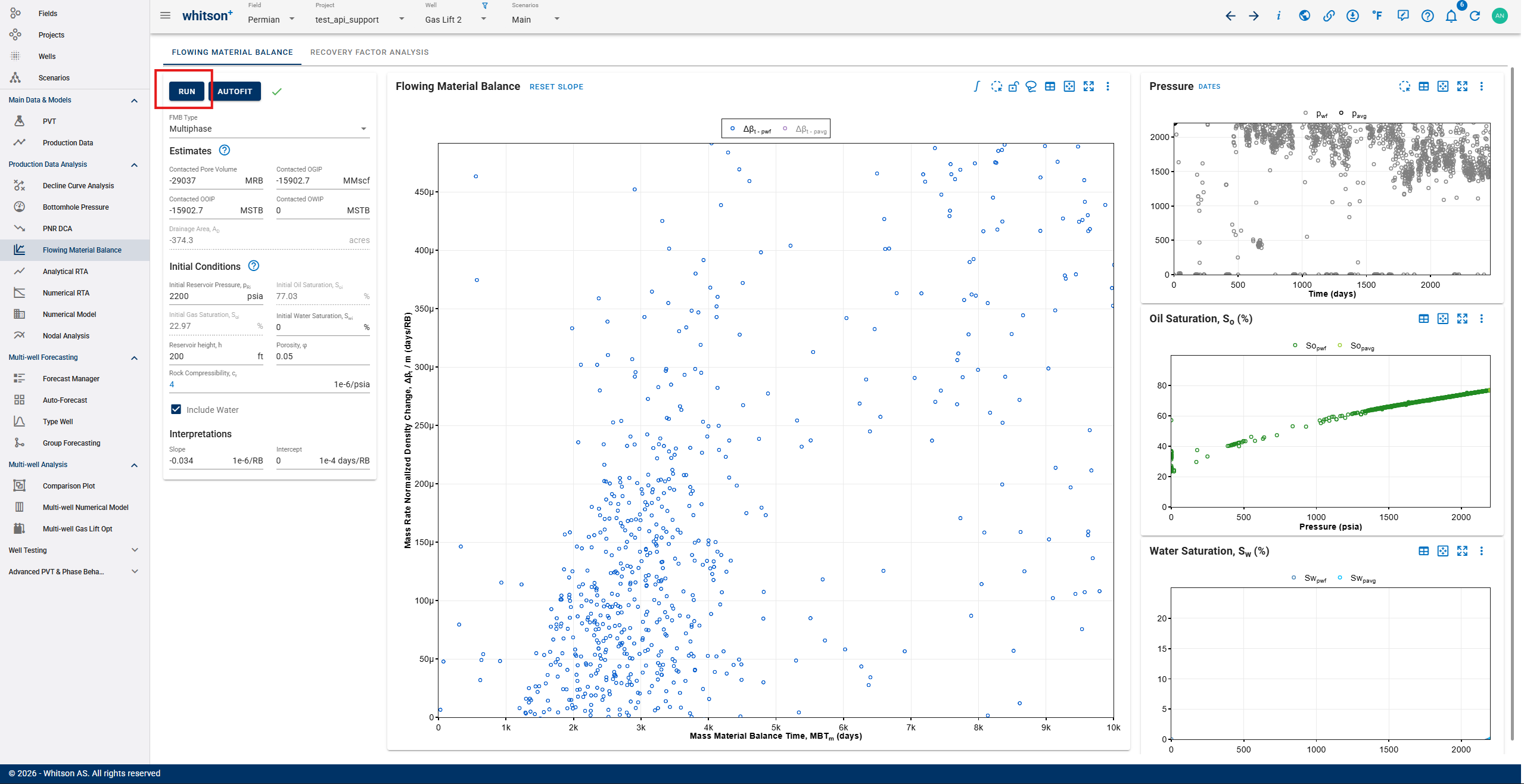
Or Using External API (available in Swagger):

 1
 2
 3
 4
 5
 6
 7
 8
 9
10
11
12
13
14
15
16
17
18
19
20
21
22 | def run_fmb_calc(whitson_connection, well_ids: list[int]):
"""
Runs the calculation for Multiphase FMB and/or bottom hole pressure
"""
base_url = f"http://{whitson_connection.client_name}.whitson.com/api-external/v1/wells/run_multiphase_fmb"
response = requests.get(
base_url,
headers={
"content-type": "application/json",
"Authorization": f"Bearer {whitson_connection.access_token}",
},
params={“well_ids”:well_ids}
)
if response.status_code == 202:
print(f"successfully ran bhp calc and/or fmb on well:
{well_id}")
return response
else:
print(response.text)
return None
|
Example:
 1
 2
 3
 4
 5
 6
 7
 8
 9
10
11
12
13
14
15
16
17
18 | import whitson_connect #If the function inside whitson_connection
CLIENT = <INSERT CLIENT NAME>
CLIENT_ID = <INSERT CLIENT ID>
CLIENT_SECRET = <INSERT CLIENT SECRET>
whitson_connection = whitson_connect.WhitsonConnection(
CLIENT, CLIENT_ID, CLIENT_SECRET
)
whitson_connection.access_token = whitson_connection.get_access_token_smart()
whitson_wells = whitson_connection.get_wells_from_projects(PROJECT_ID_LIST, 500)
external_id_dict = {item["external_id"]: item["id"] for item in whitson_wells}
well_id_list = list(external_id_dict.values())
whitson_connection.run_fmb_calc(well_ids) #If inside whitson_connection
whitson_connection.run_fmb_calc(whitson_connection, well_ids)
|
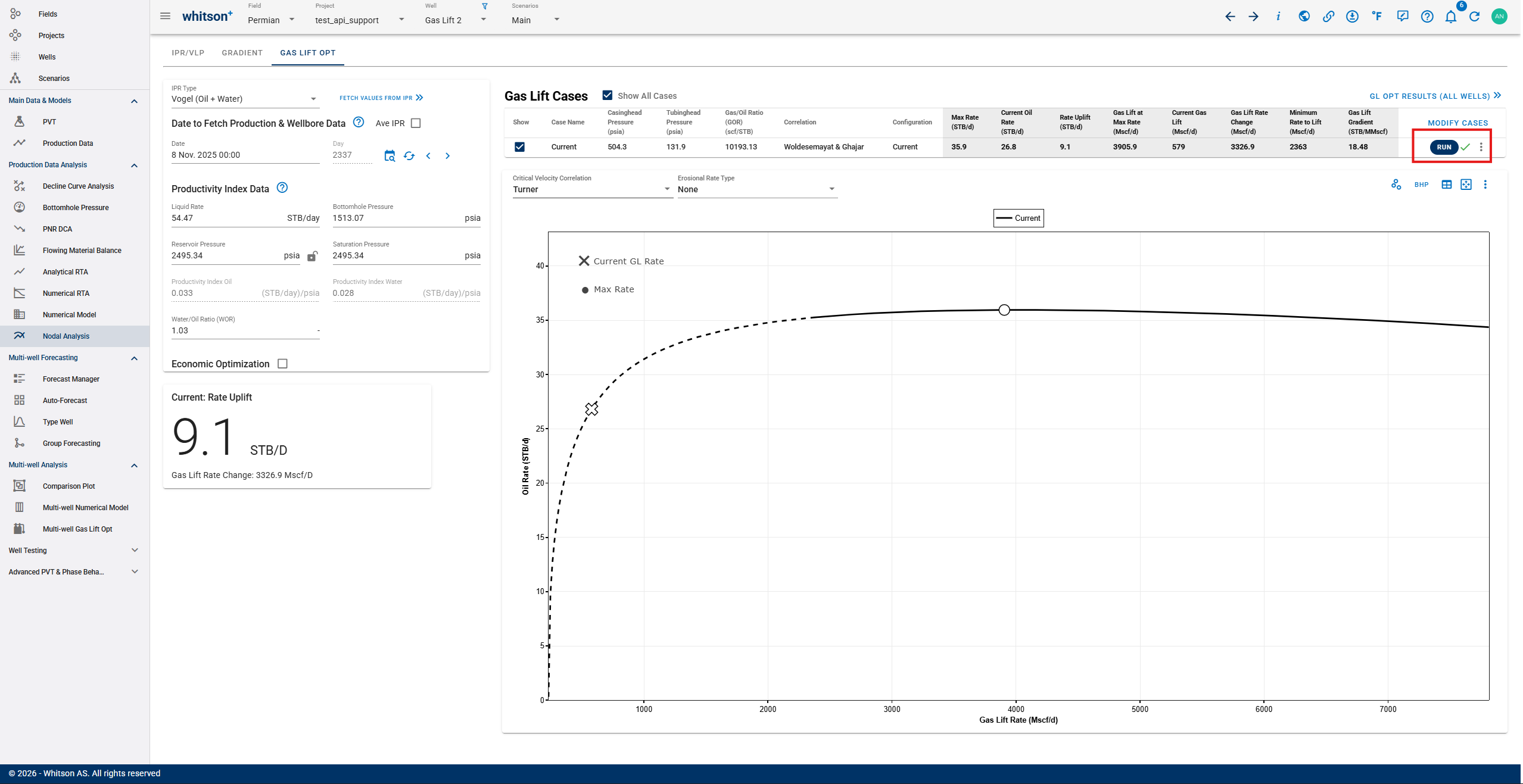
Step 4: Run Gas Lift Optimizer
This endpoint retrieves the latest available IPR and VLP data, and uses that data to run the calculation. When executed, it automatically fetches the most recent datasets for each well and performs the run accordingly, including executing all configured Gas Lift Optimizer cases.
Or Using External API (available in Swagger):

 1
 2
 3
 4
 5
 6
 7
 8
 9
10
11
12
13
14
15
16
17
18
19 | def run_gas_lift_opt_bulk(whitson_connection, payload):
print(f"Running gas lift opt for {len(payload['well_ids'])} wells")
response = requests.patch(
f"http://{whitson_connection.client_name}.whitson.com/api-external/v1/wells/ bulk_run_gas_lift_optimizer",
headers={
"content-type": "application/json",
"Authorization": f"Bearer{whitson_connection.access_token}",
},
json=payload,
)
if response.status_code > 300:
print(f"Error running gas lift opt for wells")
print(response.text)
return
print(f"Sent input for {len(payload['well_ids'])} wells to the engine")
return response.json()
|
Example:
 1
 2
 3
 4
 5
 6
 7
 8
 9
10
11
12
13
14
15
16
17
18
19
20
21
22 | import whitson_connect # If the function inside whitson_connection
CLIENT = <INSERT CLIENT NAME>
CLIENT_ID = <INSERT CLIENT ID>
CLIENT_SECRET = <INSERT CLIENT SECRET>
whitson_connection = whitson_connect.WhitsonConnection(
CLIENT, CLIENT_ID, CLIENT_SECRET
)
whitson_connection.access_token = whitson_connection.get_access_token_smart()
whitson_wells = whitson_connection.get_wells_from_projects(PROJECT_ID_LIST, 500)
external_id_dict = {item["external_id"]: item["id"] for item in whitson_wells}
well_id_list = list(external_id_dict.values())
payload = {
"well_ids": well_id_list
}
whitson_connection.run_gas_lift_opt_bulk(payload) #If inside whitson_connection
whitson_connection.run_gas_lift_opt_bulk(whitson_connection, payload)
|
Step 5: Get Gas Lift Optimizer Result
Via External API (available in Swagger):

 1
 2
 3
 4
 5
 6
 7
 8
 9
10
11
12
13
14
15
16
17
18
19
20
21
22
23
24
25
26
27
28
29
30
31
32
33
34
35
36
37
38
39
40
41
42
43
44
45
46
47
48
49
50
51
52
53
54
55
56
57
58
59
60
61
62
63
64
65
66
67
68
69
70
71
72
73
74
75 | def get_gas_lift_opt_bulk(
whitson_connection, project_ids: list[int], page_size: int = 1000
):
"""
Get a gas lift opt result from projects with project_id given in
list.
Example: whitson_wells = whitson_connection.get_gas_lift_opt_bulk(
[1, 2, 3]
)
Lower the page size if 502 Error
"""
all_wells = []
base_url = (
f"http://{self.client_name}.whitson.com/api-external/v1/bulk_gas_lift_optimizer_results"
)
for project_id in project_ids:
page = 1 # Start with the first page
while True:
response = requests.get(
base_url,
headers={
"content-type": "application/json",
"Authorization": f"Bearer {self.access_token}",
},
params={
"project_id": project_id,
"page": page,
"page_size": page_size, # Lower this if Error 502
},
)
res = response.json()
retries = 0
while response.status_code >= 500 and retries < 3:
retries += 1
print(f"Error occured Error {response.status_code} encountered.")
print(response.text)
print(f"Retrying {retries}")
response = requests.get(
base_url,
headers={
"content-type": "application/json",
"Authorization": f"Bearer {self.access_token}",
},
params={
"project_id": project_id,
"page": page,
"page_size": page_size, #Lower if Error 502
},
)
res = response.json()
if response.status_code >= 400:
print(f"Error occured Error {response.status_code} encountered.")
print(response.text)
break
if (
not res or res == []
): # If the response is empty, there are no more wells
break
all_wells.extend(
res
) # Append the wells from this page to the list
page += 1 # Move to the next page
return all_wells
|
Example:
 1
 2
 3
 4
 5
 6
 7
 8
 9
10
11
12
13
14
15
16
17
18
19
20 | import whitson_connect # If the function inside whitson_connection
CLIENT = <INSERT CLIENT NAME>
CLIENT_ID = <INSERT CLIENT ID>
CLIENT_SECRET = <INSERT CLIENT SECRET>
whitson_connection = whitson_connect.WhitsonConnection(
CLIENT, CLIENT_ID, CLIENT_SECRET
)
whitson_connection.access_token = whitson_connection.get_access_token_smart()
whitson_wells = whitson_connection.get_wells_from_projects(PROJECT_ID_LIST, 500)
external_id_dict = {item["external_id"]: item["id"] for item in whitson_wells}
well_id_list = list(external_id_dict.values())
project_id = [1, 2, 3]
whitson_connection.get_gas_lift_opt_bulk(project_id, 5000) #If inside whitson_connection
whitson_connection.get_gas_lift_opt_bulk(whitson_connection, project_id, 5000)
|
Return Result
Return result in json form (example):
{
  "wells": {
    "23": {
      "custom_attributes": {
        "text_custom": "Test 1"
      },
      "date": "2021-09-07T00:00:00",
      "from_date": null,
      "gas_lift": {
        "current_rate": 438.2907436457437,
        "delta_gas_lift": 1044.826858717554,
        "gradient_gas_lift": 1284.9460504048998,
        "max_gas_lift": 1260.826858717554,
        "max_rate": 744.4309424422523,
        "min_rate_lift": 557.1848977471407,
        "oil_uplift_gas_lift_rate_change": 293.0056748084296,
        "qg_gas_lift": 216,
        "rate_uplift": 306.1401987965086
      },
      "gas_rate": {
        "current_gas_rate": 77.45,
        "max_gas_rate": 131.5360036779423
      },
      "ipr_input": {
        "n_gas_ipr": null,
        "productivity_index_gas": null,
        "productivity_index_oil": 1.66279135301573,
        "productivity_index_water": 0.4628032420046975,
        "saturation_pressure": 1606.2029837667383,
        "water_oil_ratio": 0.2783291127689184
      },
      "liquid_rate": {
        "current_liquid_rate": 560.3299999999999,
        "max_liquid_rate": 952.8319819211006
      },
      "pressure": {
        "casinghead_pressure": 847.684,
        "correlation": "woldesemayat_and_ghajar",
        "tubinghead_pressure": 152.301
      },
      "well_information": {
        "name": "SPE-DATA-REPOSITORY-DATASET-1-WELL-2-HAWK",
        "uwi_api": "SPE-DATA-REPOSITORY-DATASET-1-WELL-2-HAWK"
      }
    }
  }
}
With the note that the "23" represent the well_id. These values can be found in the result table available on the front end.